IOS 学习笔记(UITableView&Something else)PART 4
有个好消息是前文说到的公积金已经审核并发放了。可喜可贺~~
没有坏消息,让您失望了。
继续继续:
为空白项目添加UITableView首页
Treehouse的课程进展比较缓慢,目前看到如何创建一个用于查看博客的应用,BlogReader,基于UITableView,老师很负责地详细说明了如何从一个空白项目入手创建一个UITableView,首先,创建一个空白项目,
[caption id=”” align=”aligncenter” width=”743”]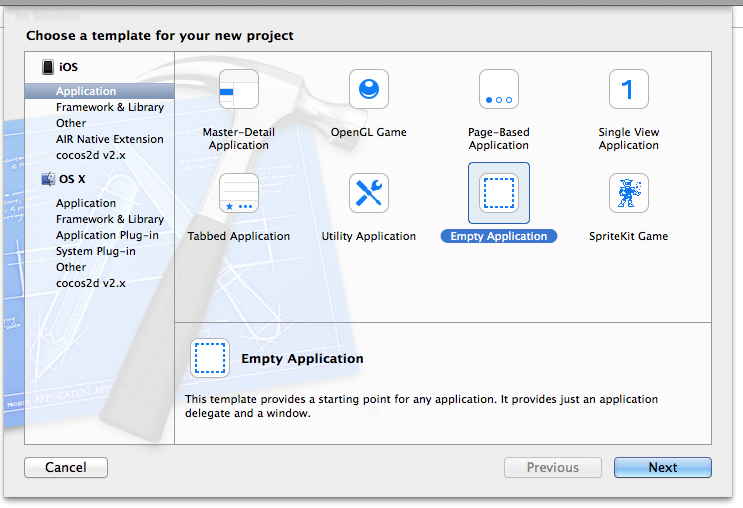 创建一个新的空白项目[/caption]
所谓空项目,那就是什么都木有:
[caption id=”” align=”aligncenter” width=”255”] 什么都没有,只有基本的AppDelegate[/caption]
首先添加一个StoryBoard作为起点,右键点击新建文件,类型选择User Interface里面的StoryBoard
[caption id=”” align=”aligncenter” width=”589”]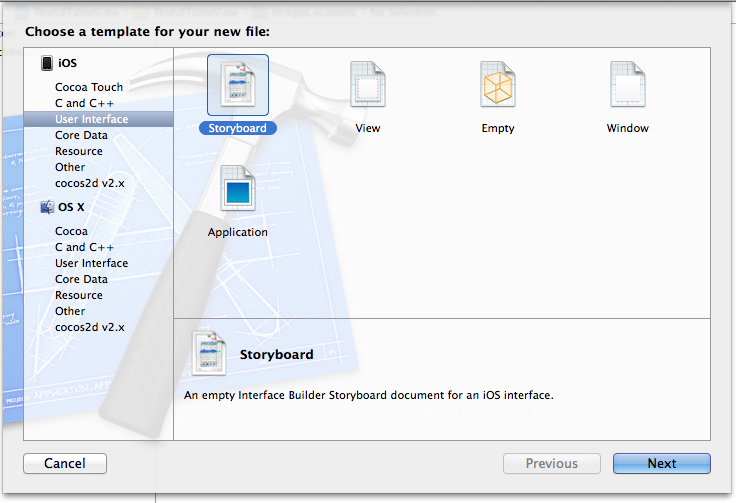 创建新的Storyboard[/caption]
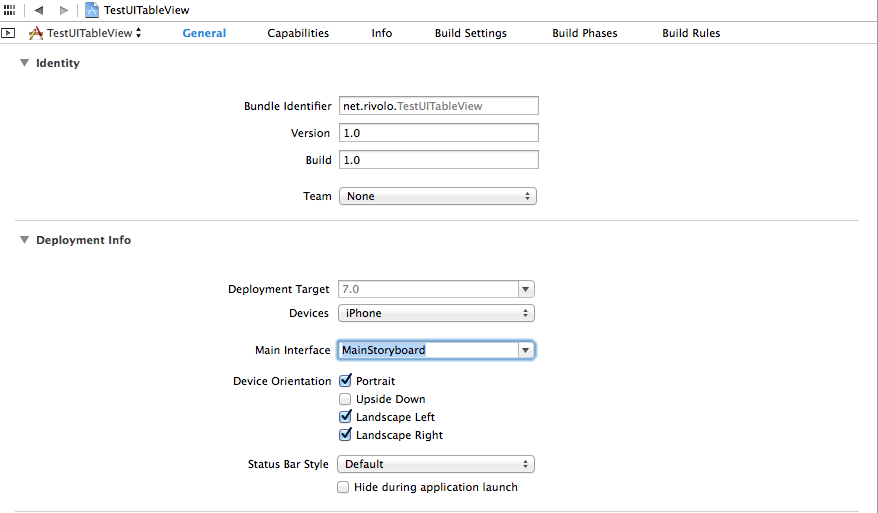
有了StoryBoard之后,不要忘记在项目配置页面上将Main Interface指定为这个StoryBoard,否则运行起来项目,看到的仍将是一片白。
下面,拽一个TableView Controller上去吧~
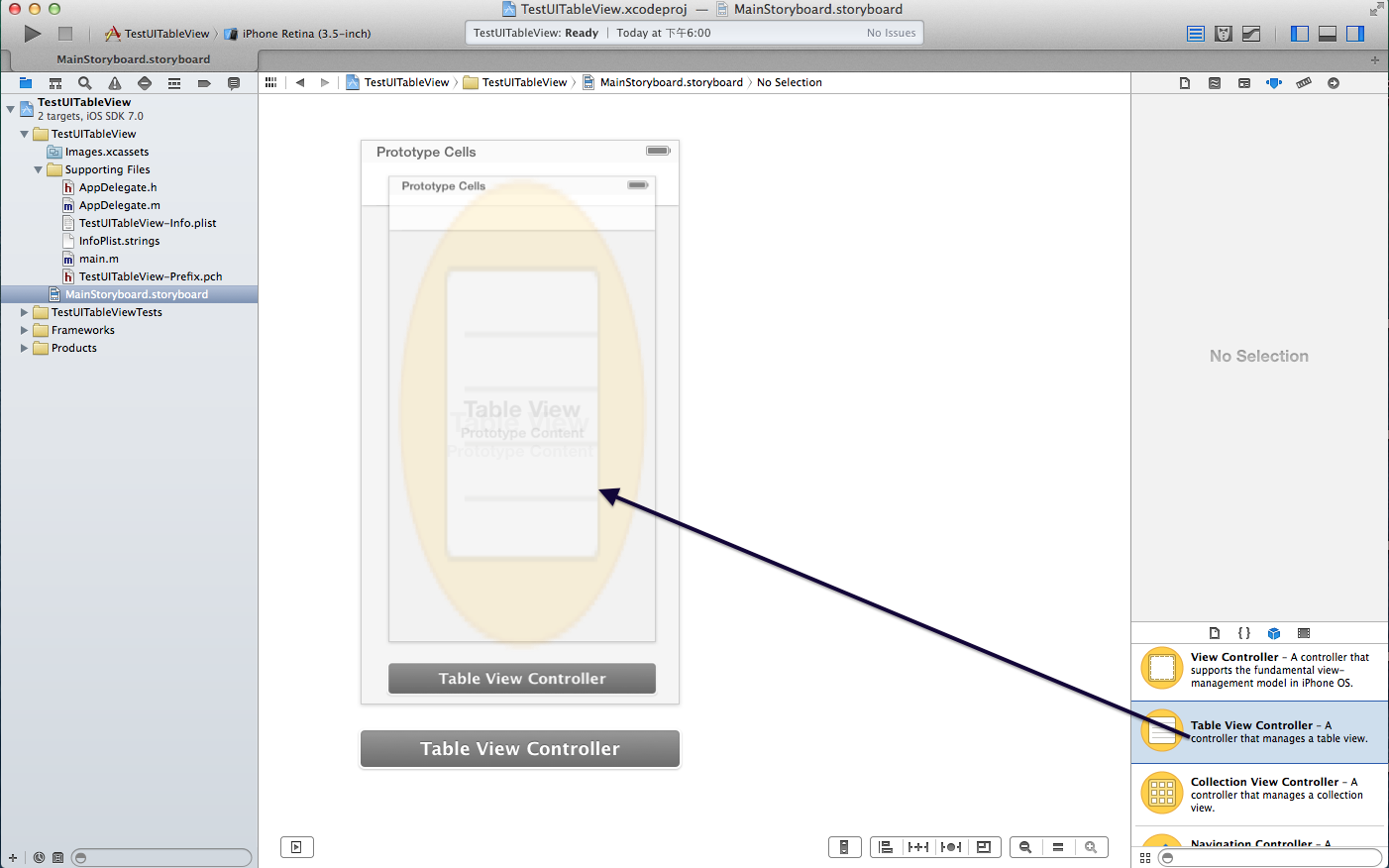
然后,要为这个View准备一个对应的TableViewController,用于处理代码逻辑。
还是右键创建一个新文件,选择继承类型为UITableViewController,打开对应的.m文件,就看到了已经实现的一些方法。在这里,可以通过定义一个数组来显示对应的数据,不多说,直接上码:
#import <UIKit/UIKit.h>

@interface TestViewController : UITableViewController
@property(nonatomic,strong)NSArray *blogPosts;
@end
#import "TestViewController.h"

@interface TestViewController ()

@end

@implementation TestViewController

- (id)initWithStyle:(UITableViewStyle)style
{
    self = [super initWithStyle:style];
    if (self) {

    }
    return self;
}

- (void)viewDidLoad
{
    [super viewDidLoad];
    self.blogPosts = [NSArray arrayWithObjects:@"Blog1",@"Blog2",@"Blog3", nil];
}

- (void)didReceiveMemoryWarning
{
    [super didReceiveMemoryWarning];
    // Dispose of any resources that can be recreated.
}

#pragma mark - Table view data source

- (NSInteger)numberOfSectionsInTableView:(UITableView *)tableView
{
    // Return the number of sections.
    return 1;
}

- (NSInteger)tableView:(UITableView *)tableView numberOfRowsInSection:(NSInteger)section
{
    // Return the number of rows in the section.
    return self.blogPosts.count;
}

- (UITableViewCell *)tableView:(UITableView *)tableView cellForRowAtIndexPath:(NSIndexPath *)indexPath
{
    static NSString *CellIdentifier = @"Cell";
    UITableViewCell *cell = [tableView dequeueReusableCellWithIdentifier:CellIdentifier forIndexPath:indexPath];
    cell.textLabel.text = self.blogPosts[indexPath.row];
    // Configure the cell...

    return cell;
}

/*
// Override to support conditional editing of the table view.
- (BOOL)tableView:(UITableView *)tableView canEditRowAtIndexPath:(NSIndexPath *)indexPath
{
    // Return NO if you do not want the specified item to be editable.
    return YES;
}
*/

/*
// Override to support editing the table view.
- (void)tableView:(UITableView *)tableView commitEditingStyle:(UITableViewCellEditingStyle)editingStyle forRowAtIndexPath:(NSIndexPath *)indexPath
{
    if (editingStyle == UITableViewCellEditingStyleDelete) {
        // Delete the row from the data source
        [tableView deleteRowsAtIndexPaths:@[indexPath] withRowAnimation:UITableViewRowAnimationFade];
    }
    else if (editingStyle == UITableViewCellEditingStyleInsert) {
        // Create a new instance of the appropriate class, insert it into the array, and add a new row to the table view
    }
}
*/

/*
// Override to support rearranging the table view.
- (void)tableView:(UITableView *)tableView moveRowAtIndexPath:(NSIndexPath *)fromIndexPath toIndexPath:(NSIndexPath *)toIndexPath
{
}
*/

/*
// Override to support conditional rearranging of the table view.
- (BOOL)tableView:(UITableView *)tableView canMoveRowAtIndexPath:(NSIndexPath *)indexPath
{
    // Return NO if you do not want the item to be re-orderable.
    return YES;
}
*/

/*
#pragma mark - Navigation

// In a story board-based application, you will often want to do a little preparation before navigation
- (void)prepareForSegue:(UIStoryboardSegue *)segue sender:(id)sender
{
    // Get the new view controller using [segue destinationViewController].
    // Pass the selected object to the new view controller.
}

 */

@end
只做到这里,是不行的,还有两个地方要修改,第一是将AppDelegate.m中的这个函数做一下修改,它自作主张地为你添加了一个空白的Window
- (BOOL)application:(UIApplication *)application didFinishLaunchingWithOptions:(NSDictionary *)launchOptions
{
//    self.window = [[UIWindow alloc] initWithFrame:[[UIScreen mainScreen] bounds]];
//    // Override point for customization after application launch.
//    self.window.backgroundColor = [UIColor whiteColor];
//    [self.window makeKeyAndVisible];
    return YES;
}
然后,你再运行项目时,会发现有一个异常:
'NSInternalInconsistencyException', reason: 'unable to dequeue a cell with identifier Cell - must register a nib or a class for the identifier or connect a prototype cell in a storyboard'
由于列表的实现,是利用多个Cell项目翻滚实现的,否则如果有1000个子项目的长列表,你的App会死得很卡,因此Cell是会被反复使用的,所以要在StoryBoard面板中设置好它,如下图
 至于为什么填上”Cell”,回头看看TableViewController.m中的代码就明白了。
至此,它终于显示正常了。
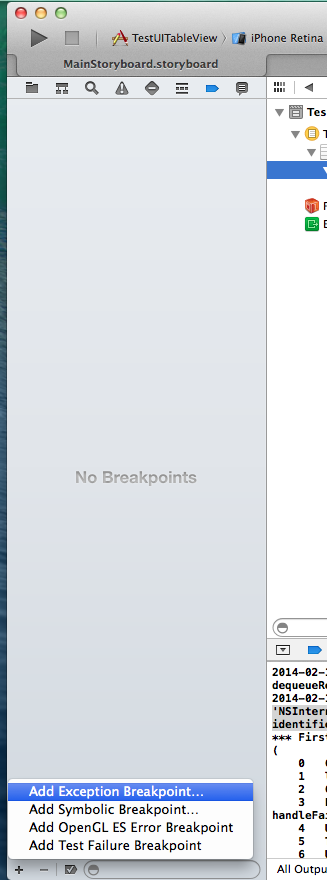
异常断点
当程序崩溃的时候我很想知道是哪里出了问题,XCode再次显示出了它牛逼的一面,通过如下方式,可以为程序添加一个异常断点:
对象类型判断
NSString *a =@"a";
[a isKindOfClass:[NSString class]];