iOS developing note part5 UILocalizedIndexedCollation
Time to say something about iOS developing!!!! Yeah!!!
This is what I got for myself!
I quit my job last month, and became a freelance, WOW~
UILocalizedIndexedCollation
The way to make a section index bar. First thing you should do is creating the array with a group of sub-array. The structure will be like this:
[
  {
    "keyword": "A",
    "items": [
      "Alee",
      "Albert",
      "Arch"
    ]
  },
  {
    "keyword": "B",
    "items": [
      "Ben",
      "Bird",
      "鲍"
    ]
  }
]
The key problem is, to find the index the initial letter goes to, fortunately Apple provide a wordy way to do it, even you are using a locale language like Chinese. It will parse the character into phoneticize, then pick the initial.
- (void)setObjects:(NSArray *)objects {

    //Count for the section titles, like 'A' 'B' 'C', depends on your language
    NSInteger sectionTitlesCount = [[[UILocalizedIndexedCollation currentCollation] sectionTitles] count];
    //Generate array to store all the section titles
    NSMutableArray *mutableSections = [[NSMutableArray alloc] initWithCapacity:sectionTitlesCount];
    for (NSUInteger idx = 0; idx < sectionTitlesCount; idx++) {
        [mutableSections addObject:[NSMutableArray array]];
    }
    //Locate where the object should store in, the selector userName is the property name of a object which you can use as a condition.
    for (id object in objects) {
        NSInteger sectionNumber = [[UILocalizedIndexedCollation currentCollation]
                                   sectionForObject:object collationStringSelector:@selector(userName)];
        [[mutableSections objectAtIndex:sectionNumber] addObject:object];
    }
    //resort the array by alphabetic
    for (NSUInteger idx = 0; idx < sectionTitlesCount; idx++) {
        NSArray *objectsForSection = [mutableSections objectAtIndex:idx];
        [mutableSections replaceObjectAtIndex:idx withObject:[[UILocalizedIndexedCollation currentCollation] sortedArrayFromArray:objectsForSection collationStringSelector:@selector(userName)]];
    }

    //remove all the arr which contain nothing.
    NSArray *collections = [[UILocalizedIndexedCollation currentCollation] sectionIndexTitles];
    NSMutableArray *newArray = [NSMutableArray array];
    NSMutableArray *newTitleArray = [NSMutableArray array];
    for (NSUInteger i = 0; i < mutableSections.count; i++) {
        NSArray *subArr = [mutableSections objectAtIndex:i];
        if (subArr.count == 0) {
            continue;
        }
        [newArray addObject:subArr];
        [newTitleArray addObject:[collections objectAtIndex:i]];
    }

    sections = newArray;
    sectionTitles = newTitleArray;
    [self.tableView reloadData];
}
The selector userName is the property name of a object which you can use as a condition. Next you can use array sectionTitles as a section data provider.
- (NSString *)tableView:(UITableView *)tableView
titleForHeaderInSection:(NSInteger)section
{
    return [sectionTitles objectAtIndex:section];
}

- (NSArray *)sectionIndexTitlesForTableView:(UITableView *)tableView {
    return sectionTitles;
}

- (NSInteger)tableView:(UITableView *)tableView sectionForSectionIndexTitle:(NSString *)title atIndex:(NSInteger)index
{
    return [[UILocalizedIndexedCollation currentCollation] sectionForSectionIndexTitleAtIndex:index];
}
Then use array sections as a row data provider.
-(NSInteger)numberOfSectionsInTableView:(UITableView *)tableView{
    return sections.count;
}

-(NSInteger)tableView:(UITableView *)tableView numberOfRowsInSection:(NSInteger)section{
    NSArray *userInGroup = [sections objectAtIndex:section];
    return userInGroup.count;
}

-(UITableViewCell *)tableView:(UITableView *)tableView cellForRowAtIndexPath:(NSIndexPath *)indexPath{
    UITableViewCell *cell = [tableView dequeueReusableCellWithIdentifier:CELL_NAME forIndexPath:indexPath];
    NSArray *userInGroup = [sections objectAtIndex:indexPath.section];
    User *user = [userInGroup objectAtIndex:indexPath.row];
    cell.textLabel.text = user.userName;
    return cell;
}
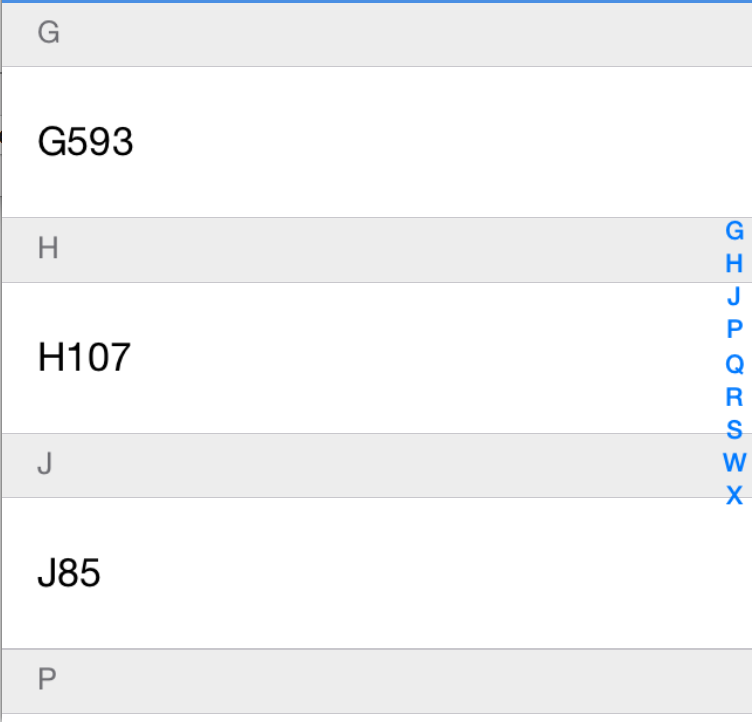
If everything goes well, you can see it like this.
OC 2 JS Communication
Regarding to the truth of ‘Html5 is coming back!’, I have to consider do some hybrid thing in my app. That means I have to do communication from both side of Objective-C and Javascript. A joyful lib named Jockey is doing a excellent work on this.
<!DOCTYPE html>
<html>
    <header>
        <meta http-equiv="Content-Type" content="text/html; charset=utf-8" />
        <script src="http://code.jquery.com/jquery-1.11.2.min.js"></script>
        <script src="jockey.js"></script>
    </header>
    <body>
        <button id="buttonPay">html payment button</button>
        <script type="text/javascript">
            Jockey.on("onTestEvent", function(payload) {
                console.log(payload);
            });
            $( "#buttonPay" ).click(function() {
                  Jockey.send("event-name", {
                  price: "0.01"
                });
            });
        </script>
    </body>
</html>
Then OC.
[Jockey on:@"marathonEventPay" perform:^(NSDictionary *payload) {
        NSString *message = [NSString stringWithFormat:@"Are you going to pay:$%@",payload[@"price"]];
        [HUDManager showSysAlertConfirm:@"Payment" message:message delegate:self];
        payloadData = payload;
    }];
[Jockey on:@"marathonEventBackView" perform:^(NSDictionary *payload) {
        [self.navigationController popViewControllerAnimated:YES];
    }];